How to price a part-exchange from a registration number
A one-minute method for dealers to value a part-exchange from the reg: decode the car, cost the MOT advisories, check days to sell and run a history check.
To price a part-exchange quickly, decode the car from its registration, read the trade bands for its actual mileage, take off the prep the MOT advisories reveal, check how long that model takes to sell, and run a £2.50 history check before you commit. On DealerPricing the whole sequence takes under a minute at the desk, with the customer still in the showroom.
Key takeaways
- A part-exchange offer is a trade purchase. Price it from the trade bands, not the retail figure.
- MOT advisories are prep costs. Tyres, brakes and corrosion come straight off the offer.
- Slow sellers need a lower offer even when the car is clean.
- Outstanding finance changes the deal; check it before the number is agreed.
- Show the customer the comparables. An explained offer is accepted far more often than a bare figure.
Why part-exchanges are priced badly
Most part-exchange mistakes happen because the offer is made under pressure. The customer is on the point of buying, the salesperson wants the deal, and the valuation is a guess from memory or a guide figure that has not caught up with the market. Either the dealer overpays and carries the loss into stock, or underbids so far that the customer walks. A repeatable method removes the guesswork and lets the salesperson explain the number. The part-exchange guide shows each screen of the method below.
Step 1: decode the car from the registration
Enter the registration and the mileage on the customer's odometer into the DealerPricing dashboard. The decoded line confirms the exact variant, engine, gearbox, fuel type and body style, which stops the classic error of valuing a base model at SE money. Ask for the mileage rather than reading it from the advert or the customer's memory; the trade bands are calculated at that figure.
Step 2: read the MOT status card
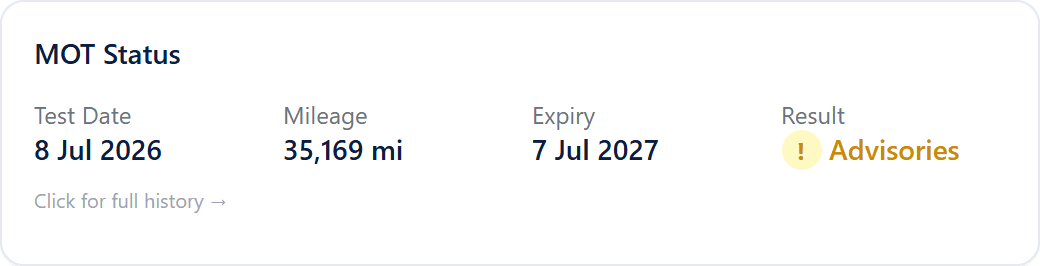
The MOT Status card shows the last test date, the mileage recorded at that test, the expiry date and whether advisories were noted. Open the History tab for the detail. Every test since 2005 is listed with the tester's own wording, so "nearside front tyre worn close to legal limit" and "corrosion to rear subframe" are visible before the car is on the ramp. Cost each advisory as prep and take it off the offer. An MOT with less than three months left is a cost too, because the car will need a test before it can be retailed. The tax and MOT guide explains the mileage chart, which also flags a reading that went backwards.
Step 3: read the trade bands and the part-exchange figure
Click Get Valuations. The card shows Trade Poor, Trade Average and Trade Clean for that mileage, plus a Part Exchange figure and the DP Retail benchmark. Decide the band from what you have seen: the advisories, the number of keepers, the service history claim and the condition of the paint and interior. Trade Clean is for a car that needs a valet and nothing else. Most part-exchanges are Trade Average with prep deducted.
The part exchange value in the glossary explains why the figure usually sits below a straight trade bid: the dealer is taking on a car it did not choose, in whatever condition it arrives, to make a retail sale happen.
Step 4: check how fast it sells
The Insights card on the Pricing tab shows the average days to sell and the market rating for that model. A part-exchange that averages 25 days to sell can be offered at the top of its band, because it will be gone before the next stocking loan payment. A car that averages 80 days, with 150 comparables already for sale within your radius, needs a lower offer or a plan to trade it straight out. The full Insights tab shows active supply, recent sold volume and the share of similar cars that sold within 30, 60 and 90 days.
Step 5: run the history check before the number is final
Click History Check. For £2.50 from the account balance the report searches the PNC and MIAFTR for theft records, the finance registers for outstanding hire purchase, PCP or conditional sale agreements, the insurers' write-off records, plate and colour changes and mileage consistency. If finance shows, the settlement figure comes off the offer and is paid to the lender, not the customer. If a Cat S or Cat N record shows, the car is a different car and the offer changes. The report is ready in seconds and the PDF stays in the account for six months. The history check page lists everything covered.
Step 6: explain the offer
Turn the screen round. The comparables table lists similar cars for sale now with price, mileage, days listed and distance, and the Sold view shows what they actually fetched. A customer who can see that eleven similar cars are for sale at £9,995 and have been sitting for 60 days understands why the offer is £7,900. This is where a live tool beats a guide book: the evidence is real cars, today, near the customer, not a printed figure they cannot verify.
A worked example
A customer offers a 2018 Nissan Qashqai 1.5 dCi N-Connecta at 61,000 miles against a new car. Decoded from the plate, the trade bands at that mileage show Trade Average of £9,400. The MOT history lists two advisories at the last test: two rear tyres close to the limit and a slight oil leak. Prep is costed at £320. Days to sell for the model is 41, with 63 comparables in a 50-mile radius, so the car is neither fast nor slow. The history check is clear. The offer is Trade Average less prep, £9,050, and the comparables show the car retailing at £11,500 to £11,900. The salesperson shows the customer the sold prices, the customer accepts, and the car is priced for the forecourt from the same screen the following morning.
What to do when the customer's expectation is higher
Customers arrive with a figure from an online instant-offer site or a private sale listing. Neither is a trade price. Instant offers are routinely reduced at inspection, and a private asking price does not include the dealer's prep, warranty and time. The honest answer is to show the comparables and the sold prices and explain what the dealer has to spend before the car earns anything. Where the gap is still too wide, offering to sell the car on a sale-or-return basis or pointing the customer to a private sale keeps the goodwill and the new car deal.
Frequently asked questions
How do dealers work out a part-exchange value?
Dealers start from the trade value of the car at its actual mileage, deduct the preparation the car needs, adjust for how quickly the model sells and check the history for finance, write-offs and mileage problems. DealerPricing shows the trade bands, MOT advisories, days to sell and a £2.50 history check from one registration search, so the whole valuation takes about a minute.
Why is a part-exchange offer lower than the trade value?
Because the dealer is taking the car in whatever condition it arrives, often without the chance to choose it, to make a retail sale happen. The offer has to cover prep, an MOT if one is due, warranty on resale, advertising and the time the car sits in stock. On a slow-selling model that time is expensive, so the offer drops further.
Can a dealer accept a part-exchange with outstanding finance?
Yes, as long as the finance is settled as part of the deal. The dealer obtains a written settlement figure from the lender, pays the lender directly and deducts that amount from the part-exchange allowance. A history check shows whether finance is recorded and which lender holds it, which is why it should be run before the offer is agreed.
What documents should I check with a part-exchange?
The V5C logbook in the customer's name at their address, the service history, the MOT certificate if there is one, and both keys. Compare the VIN on the V5C with the plate in the windscreen and the chassis stamp, and match the mileage on the odometer with the last MOT reading shown on the dashboard.